 Author
 |
Topic: MULTIWIN issues (Read 588 times) |
|
hellomike
Junior Member
member is offline


Gender: 
Posts: 55
|
 |
MULTIWIN issues
« Thread started on: Mar 4th, 2017, 10:18am » |
|
Hi,
For a BB4W project I really could use multiple output windows so I'm checking out the delivered MULTIWIN library.
Somehow there seem to be issues when text character positioning on screen is involved.
Consider the following example:
Code: INSTALL @lib$+"WINLIB5A" INSTALL @lib$+"MULTIWIN" PROC_multiwin(0) MODE 8 REM PROC_selectwin(0) FOR I%=0 TO 31 PRINT TAB(I%,I%) "*"; NEXT END
It will print some asterisks on screen at the correct coordinates.
However when unREMming the line, making 'PROC_selectwin(0)' active, the TAB() functionality seems off now.
What is going on?
Also, there seem to be a problem using the GET(X,Y) function on a window other than window#0 (@hwnd%) but maybe that is because such windows are only meant to be used for output and not input.
The very plausible cause for the issues is of course, that I'm doing something wrong!
Thanks
Mike
|
|
 Logged Logged
|
|
|
|
Richard Russell
Administrator
member is offline

Posts: 803
|
|
Re: MULTIWIN issues
« Reply #1 on: Mar 4th, 2017, 2:20pm » |
|
on Mar 4th, 2017, 10:18am, hellomike wrote:| However when unREMming the line, making 'PROC_selectwin(0)' active, the TAB() functionality seems off now. What is going on? |
|
I cannot see the problem. It makes no difference here whether the PROC_selectwin(0) line is REMmed out or not: the display is identical either way:
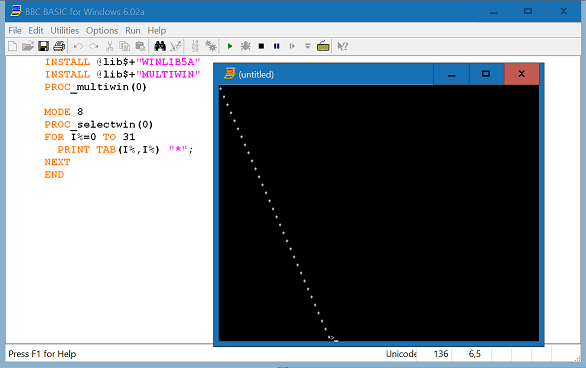
Perhaps you can similarly upload a screenshot so we can see what it is that you see!
Quote:| Also, there seem to be a problem using the GET(X,Y) function on a window other than window#0 |
|
That cannot be expected to work; the 'child' windows have only limited functionality. Indeed GET(x,y) won't work reliably even in the mainwin, if you have created multiple windows, because they all share the same text buffer!
Richard.
|
|
Logged
|
|
|
|
hellomike
Junior Member
member is offline
Gender:
Posts: 55
|
|
Re: MULTIWIN issues
« Reply #2 on: Mar 5th, 2017, 10:48am » |
|
Thanks for the fast reply.
Think I found a something very relevant by adding printing the value of I% ánd @vdu%!220 after the asterisk.
So
Code: PRINT TAB(I%,I%) "*";I%;" ";@vdu%!220;
See the difference in:
https://www.dropbox.com/s/ypr4v8mokbsiln5/multiwinissue.JPG?dl=0
It seems that after PROC_selectwin(0), the mode (8) has now more vertical text lines to display. I.e. value of @vdu%!220 has changed!
It seems to happen in most (all?) modes but not when MODE isn't used. Both 45 lines.
Also not in MODE 7 but I doubt if that is representative.
Mike
|
|
Logged
|
|
|
|
Richard Russell
Administrator
member is offline
Posts: 803
|
|
Re: MULTIWIN issues
« Reply #3 on: Mar 5th, 2017, 1:13pm » |
|
on Mar 5th, 2017, 10:48am, hellomike wrote:| I.e. value of @vdu%!220 has changed! |
|
That is 'by design'. @vdu%!220 normally contains the character height of the currently-selected font (i.e. the tmHeight value returned by GetTextMetrics) and that is what MULTIWIN assumes. On return from PROC_selectwin() it sets @vdu%!220 to that value.
However MODE (and similarly VDU 23,22...) is a special case. It sets @vdu%!220 not (necessarily) to the character height of the currently selected font, but to an absolute value determined by the MODE number (or in the case of VDU 23,22... specified by the user).
MULTIWIN doesn't know that @vdu%!220 was - unusually - set this way, so when PROC_selectwin() restores it to the normal value based on the character height, it may in fact change as you spotted.
The expectation - and the assumption that MULTIWIN makes - is that you are unlikely to want to mix a 'legacy' statement like MODE (provided, primarily, for compatibility with BBC Micro programs) with a 'modern' GUI facility like creating multiple windows.
Because you have no control over the typeface selected by MODE (or VDU 23,22) - it's chosen by Windows and is very likely to be different depending on the DPI value - you will commonly want to override that choice using a *FONT command. If you do that MULTIWIN will work as expected:
Code: INSTALL @lib$+"WINLIB5A" INSTALL @lib$+"MULTIWIN" PROC_multiwin(0) MODE 8 *FONT Courier New PRINT @vdu%!220 PROC_selectwin(0) PRINT @vdu%!220
Richard.
|
|
|
|
hellomike
Junior Member
member is offline
Gender:
Posts: 55
|
|
Re: MULTIWIN issues
« Reply #4 on: Mar 6th, 2017, 12:02pm » |
|
Nicely explained.
Ok, I will use *FONT to have better control.
However only after reading a CSV file, I know how many lines of data need to be displayed and how wide the lines will be.
Assuming that I use "Courier New,16,B" as font, how can I resize the default @hwnd% to the size I need, without using VDU 23,22?
The size of additional output windows I specify with FN_createwin().
I guess I first do *FONT and use @vdu%!216 and @vdu%!220 to calculate width and height that I need in VDU 23,22 immediately followed by PROC_multiwin(0).
Mike
|
|
Logged
|
|
|
|
Richard Russell
Administrator
member is offline
Posts: 803
|
|
Re: MULTIWIN issues
« Reply #5 on: Mar 6th, 2017, 1:46pm » |
|
on Mar 6th, 2017, 12:02pm, hellomike wrote:| However only after reading a CSV file, I know how many lines of data need to be displayed and how wide the lines will be. |
|
It's non-standard to determine the size of the font from the amount of data to be displayed. The way things work, as a rule, is that the size of font is determined by legibility considerations. Then, if the data doesn't fully fit the window (or screen etc.) with that size of font, some means of dealing with that needs to be incorporated (e.g. scrolling or paging).
As I am sure you know, I am very concerned about 'accessibility', that is writing programs in such a way that they can be used by people with disabilities. Poor eyesight is probably one of the most common impairments that you need to take account of. So for example if the user has configured his PC for 'large fonts' (which corresponds to the DPI value being increased) your program(s) should respect that setting. In some jurisdictions it is actually a legal requirement that you should make 'reasonable adjustments' to meet the needs of the disabled.
Of course if your program is designed for personal use only you are not bound by such constraints. In that case you can do anything you like, such as adjust the size of the text to fit the amount of data. That can also be an appropriate thing to do in the case of (say) the title page of a video game. In such a situation it is acceptable to set the font to an absolute size in pixels rather than a size which is related to the DPI value (which is the default in BB4W and most other Windows applications). But since Windows may not be able to create a font with precisely the dimensions you specify, you still need to cope with some variability.
I should add that things get more complicated if you are writing cross-platform code. Operating Systems other than Windows may not provide system-wide means for the user to adjust the font size, or at least not in a compatible way. For example in BBCSDL the *FONT command does not take account of the DPI value, since although that would be possible in Windows, the other supported platforms don't all provide an equivalent capability.
In BBCSDL, when used with a touchscreen at least, I have attempted to address that issue to some degree by making provision for the output to be zoomed and panned without any extra effort by the BASIC programmer.
Richard.
|
|
|
|
hellomike
Junior Member
member is offline
Gender:
Posts: 55
|
|
Re: MULTIWIN issues
« Reply #6 on: Mar 8th, 2017, 07:39am » |
|
Thanks for the insight. Lucky for me, the final program to be, will be for personal use only but your input makes me more aware of the do's and dont's.
I might have found another undocumented issue for programmers to consider.
When calling FN_createwin(), make sure the main output window is the active one. So, as for PROC_closewin(), if necessary precede the FN_createwin() statement with a PROC_selectwin(0).
Failing to do this will cause a new window to be a child of the wrong active window which may result in erratic behavior.
Mike
|
|
Logged
|
|
|
|
|


