 Author
 |
Topic: I must be missing something simple .......... (Read 2001 times) |
|
hitsware
Junior Member
member is offline


Gender: 
Posts: 51
|
 |
Re: I must be missing something simple ..........
« Reply #4 on: Aug 8th, 2017, 04:40am » |
|
The IDE on the RPi has no menus etc.
Only what I posted..............
|
|
 Logged Logged
|
https://www.youtube.com/watch?v=ePhUBBGyVmI
|
|
|
Richard Russell
Administrator
member is offline

Posts: 803
|
|
Re: I must be missing something simple ..........
« Reply #7 on: Aug 8th, 2017, 08:24am » |
|
on Aug 8th, 2017, 12:17am, hitsware wrote:| If I don't use line numbers the commands immediately run, but if I use a line number I get "syntax error" |
|
That's perfectly normal. BBC BASIC for Windows has never had the interactive ('shell') mode of operation that older versions had - it's why commands like LIST, LOAD, NEW and SAVE don't exist! That capability is superfluous when you have an IDE.
Richard.
|
|
Logged
|
|
|
|
Richard Russell
Administrator
member is offline
Posts: 803
|
|
Re: I must be missing something simple ..........
« Reply #8 on: Aug 8th, 2017, 08:37am » |
|
on Aug 8th, 2017, 04:40am, hitsware wrote:| The IDE on the RPi has no menus etc. |
|
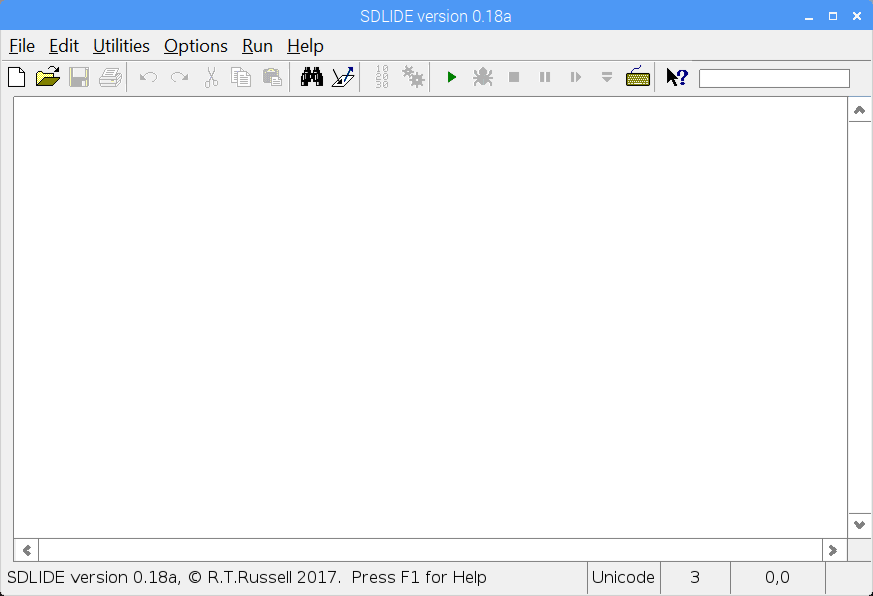
The IDE on the RPi is identical in appearance to that on the other BBCSDL editions (except Android of course). See the screenshot below, taken from my Raspberry Pi 3. What you showed was immediate mode.
Richard.
|
|
|
|
michael
Full Member
member is offline
Posts: 157
|
|
Re: I must be missing something simple ..........
« Reply #9 on: Aug 8th, 2017, 11:25am » |
|
The steps I take to run BBCSDL on my Raspberry PI3 are as follows:
* after booting the PI I left click on the file manager folder
* then I double left click "Downloads" folder
----My copy is unzipped in the downloads folder
* You should see a file called "bbcsdl" and it has an icon of a paper airplane
* Double Left click with your mouse
--- a window will pop up and ask "This file bbcsdl is executable. Do you want to execute it? "
* Left click on "Execute" with your mouse
You then are prompted to choose IDE
* I selected "Richard Russell's SDLIDE"
And the screen Richard shows on previous post is active.
When I save my files I make sure the files are in a folder called @usr$
And its easy from that point.
( aside from the assumption that the installation was done according to instructions.)
Here is a sample program to help you get started:
Code: PROCgraphics(1000,500) REPEAT resp$=FNbuttonz(100,100,"clearitall") resp$=FNbuttonz(100,100,"Show me a circle ") WAIT 1 REPEAT k% = INKEY(4) resp%=FNmoucheck UNTIL k%<>-1 OR resp% >0 UNTIL resp$="Show me a circle " PROCcolor("f","yellow") CIRCLE FILL 500,500,150 END DEF FNmoucheck PRIVATE mx%,my%,mb%,x%,y%,b% MOUSE x%,y%,b% IF mx%=0 AND my%=0 AND mb%=0 THEN mx%=x%:my%=y%:mb%=b%: =-1 IF mx%=x% AND my%=y% AND mb%=b% THEN =-1 ELSE mx%=x%:my%=y%:mb%=b%:=1 DEF PROCgraphics(x,y) VDU 23,22,x;y;8,15,16,1 OFF VDU 5 ENDPROC DEFFNbuttonz(X,Y,msg$) LOCAL initialx%,fi%,reduction%,tx,ty,mx%,my%,mb%,ad%,ady%,c$ PRIVATE st$ IF msg$<> "clearitall" THEN initialx%=LEN(msg$) LET tx= X+initialx%+25 LET ty= Y:reduction%=0 reduction%=initialx%/2 reduction%=reduction%*6 IF initialx%<20 THEN reduction%=reduction%/2 initialx%=initialx%*22-reduction% MOUSE mx%,my%,mb% ad%=initialx%+8:ad%+=X:ady%=Y-28 IF mx% >X AND mx%<ad% AND my%<Y+8 AND my%>ady% THEN c$="255,255,255" IF mb%=4 THEN st$=msg$ ELSE c$="200,200,200" ENDIF IF FNrgb(X,Y)="000,000,000" THEN c$="200,200,200" PROCcolor("f",c$) IF FNrgb(X,Y)<>c$ THEN FOR fi%=12 TO 48 LINE X-3,Y+20-fi%,X+initialx%+8,Y+20-fi% NEXT PROCcolor("f","000,000,000") MOVE tx,ty PRINT msg$ ENDIF ENDIF IF msg$="clearitall" THEN st$="" MOVE 0,0 REM hide that thing =st$ DEF PROCcolor(fb$,rgb$) PRIVATE assemble$,br%,bg%,bb% IF rgb$="0" OR rgb$="black" THEN rgb$="000,000,000" IF rgb$="1" OR rgb$="red" THEN rgb$="200,000,000" IF rgb$="2" OR rgb$="green" THEN rgb$="000,200,000" IF rgb$="3" OR rgb$="yellow" THEN rgb$="200,200,000" IF rgb$="4" OR rgb$="blue" THEN rgb$="000,000,200" IF rgb$="5" OR rgb$="magenta" THEN rgb$="200,000,200" IF rgb$="6" OR rgb$="cyan" THEN rgb$="000,200,200" IF rgb$="7" OR rgb$="white" THEN rgb$="200,200,200" IF rgb$="8" OR rgb$="grey" THEN rgb$="056,056,056" IF rgb$="9" OR rgb$="light red" THEN rgb$="248,056,056" IF rgb$="10" OR rgb$="light green" THEN rgb$="056,248,056" IF rgb$="11" OR rgb$="light yellow" THEN rgb$="248,248,056" IF rgb$="12" OR rgb$="light blue" THEN rgb$="056,056,248" IF rgb$="13" OR rgb$="light magenta" THEN rgb$="248,056,248" IF rgb$="14" OR rgb$="light cyan" THEN rgb$="056,248,248" IF rgb$="15" OR rgb$="light white" THEN rgb$="248,248,248" assemble$=rgb$ br%=VAL(MID$(assemble$,1,3)):bg%=VAL(MID$(assemble$,5,3)):bb%=VAL(MID$(assemble$,9,3)) IF fb$="f" OR fb$="F" THEN COLOUR 0,br%,bg%,bb% : GCOL 0 IF fb$="b" OR fb$="B" THEN COLOUR 1,br%,bg%,bb% : GCOL 128+1 ENDPROC DEFFNrgb(x%,y%) LOCAL rgb%, r&, g&, b& rgb%=TINT(x%,y%) r&=rgb% :REM Use byte variable as mask. g&=rgb% >>8 b&=rgb% >>16 =FNnumstr(r&)+","+FNnumstr(g&)+","+FNnumstr(b&) DEFFNnumstr(num) LOCAL cov$,l% cov$=STR$(num) l%=LEN(cov$) IF l%=1 THEN ret$="00"+cov$ IF l%=2 THEN ret$="0"+cov$ IF l%=3 THEN ret$=cov$ =ret$ |
| « Last Edit: Aug 8th, 2017, 11:29am by michael » |
Logged
|
I like reinventing the wheel, but for now I will work on tools for D3D
|
|
|
hitsware
Junior Member
member is offline
Gender:
Posts: 51
|
|
Re: I must be missing something simple ..........
« Reply #10 on: Aug 8th, 2017, 1:14pm » |
|
OK .....Got it..........I was using " ./bbcsdl " from the terminal ( or >run )
to open. ( which is what the instructions say ) ?
Thank You 
|
|
Logged
|
https://www.youtube.com/watch?v=ePhUBBGyVmI
|
|
|
Richard Russell
Administrator
member is offline
Posts: 803
|
|
Re: I must be missing something simple ..........
« Reply #11 on: Aug 8th, 2017, 2:42pm » |
|
on Aug 8th, 2017, 1:14pm, hitsware wrote:| I was using " ./bbcsdl " from the terminal |
|
That's fine, it's the way I always start it myself. For it to start up in immediate mode you must be typing something (anything) after the ./bbcsdl (it's expecting a filename there and if the file doesn't exist that's the effect).
Richard.
|
|
Logged
|
|
|
|
hitsware
Junior Member
member is offline
Gender:
Posts: 51
|
|
Re: I must be missing something simple ..........
« Reply #12 on: Aug 8th, 2017, 3:00pm » |
|
on Aug 8th, 2017, 2:42pm, Richard Russell wrote: For it to start up in immediate mode you must be typing something (anything) after the ./bbcsdl (it's expecting a filename there and if the file doesn't exist that's the effect).
Richard. |
|
I'm not ....Where do you keep the executable ?
It probably has something to do with that.
I can't get SYS to work ?
Should be like terminal inputs ....
|
|
Logged
|
https://www.youtube.com/watch?v=ePhUBBGyVmI
|
|
|
Richard Russell
Administrator
member is offline
Posts: 803
|
|
Re: I must be missing something simple ..........
« Reply #13 on: Aug 8th, 2017, 10:15pm » |
|
on Aug 8th, 2017, 3:00pm, hitsware wrote:| Where do you keep the executable ? |
|
Wherever you extracted the Zip! It's entirely your choice.
Quote:| I can't get SYS to work ? |
|
Many of the supplied example programs rely on SYS, so if they are running then obviously SYS is working correctly. For example you can try any of the 3D programs (e.g. 'teapot.bbc') which depend heavily on SYS.
If you need to check the syntax and parameters etc. of SYS in BBCSDL, there is an API reference here (the closest you'll get to an MSDN equivalent, but obviously the SDL API is very much simpler than the Win32 API).
Richard.
|
|
|
|
hitsware
Junior Member
member is offline
Gender:
Posts: 51
|
|
Re: I must be missing something simple ..........
« Reply #14 on: Aug 8th, 2017, 11:24pm » |
|
Hmmm ..... Does "SYS" in SDL act as if writing in the terminal ?
I.E. The below code in BASIC-256 or RUBY will play Midi notes
as if using Alsa commands in the terminal (amidi, aconnect, etc.)
Code:system "sudo modprobe snd-virmidi snd_index=0"system "aconnect 20:0 128:0"dosystem "amidi -p hw:1,0 -S'90 3C 7F' "system "amidi -p hw:1,0 -S'90 3C 0' "pause 1until falseend
Using the below: (inBBC) I get "no such System call"
Actually some kind of Midi Command without the SYS(tem?)
would be slicker ......
Code: SYS "sudo modprobe snd-virmidi snd_index=0 " SYS "aconnect 20:0 128:0" REPEAT SYS "amidi -p hw:1,0 -S'90 3c 7f'" SYS "amidi -p hw:1,0 -S'90 3c 0' " WAIT 22 UNTIL FALSE |
| « Last Edit: Aug 8th, 2017, 11:32pm by hitsware » |
Logged
|
https://www.youtube.com/watch?v=ePhUBBGyVmI
|
|
|
Richard Russell
Administrator
member is offline
Posts: 803
|
|
Re: I must be missing something simple ..........
« Reply #15 on: Aug 9th, 2017, 03:29am » |
|
on Aug 8th, 2017, 11:24pm, hitsware wrote:| Using the below (in BBC) I get "no such System call" |
|
You've omitted the "system" command verb that the original code had, which isn't right. In BBC BASIC you should be using something more like this (untried):
Code: SYS "system", "sudo modprobe snd-virmidi snd_index=0" SYS "system", "aconnect 20:0 128:0" REPEAT SYS "system", "amidi -p hw:1,0 -S'90 3C 7F' " SYS "system", "amidi -p hw:1,0 -S'90 3C 0' " WAIT 22 UNTIL FALSE END
Of course even if this code works on the Raspberry Pi it isn't 'cross-platform' so runs somewhat contrary to the spirit of BBCSDL.
Richard.
|
|
|
|
hitsware
Junior Member
member is offline
Gender:
Posts: 51
|
|
Re: I must be missing something simple ..........
« Reply #16 on: Aug 9th, 2017, 05:54am » |
|
Code:SYS "system", "amidi -p hw:1,0 -S'90 3C 7F' "SYS "system", "amidi -p hw:1,0 -S'90 3C 0' "
It works !!!!!!!!!!!!
How can I put decimal variables into the hex numbers
at the end of the amidi statements ?
FWIW Here's the Ruby way ::::::::::;
Code:### MIDIPI ######################## Assumes Timidity installed# Works on RPi .... Maybe other LinuxMachines ?# In terminal type 'timidity -iA'# Leave terminal opensystem"sudo modprobe snd-virmidi snd_index=0"#Alsasystem"aconnect 20:0 128:0" #Connectscale=[48,50,52,53,55,57,59,60] #MidiScalea=144.to_s(16) #Convertc=127.to_s(16) #MidiDatad=0.to_s(16) #to hexfor i in 0..7 #PlayScale b=scale[i].to_s(16) system"amidi -p hw:1,0 -S'#{a}#{b}#{c}'" system"amidi -p hw:1,0 -S'#{a}#{b}#{d}'" sleep 1end |
|
Logged
|
https://www.youtube.com/watch?v=ePhUBBGyVmI
|
|
|
Richard Russell
Administrator
member is offline
Posts: 803
|
|
Re: I must be missing something simple ..........
« Reply #17 on: Aug 9th, 2017, 08:48am » |
|
on Aug 9th, 2017, 05:54am, hitsware wrote:| How can I put decimal variables into the hex numbers |
|
In BBC BASIC the function for converting to a hexadecimal string is STR$~(), note the tilde after the STR$.
Incidentally I didn't address your previous question:
Quote:| Does "SYS" in SDL act as if writing in the terminal? |
|
SYS calls an API function. In BBC BASIC the way to run a 'shell' command is *RUN (conventionally pronounced 'star run') or in most cases just precede the command with an asterisk. So it may well be that this would have worked as well:
Code: *amidi -p hw:1,0 -S'90 3C 7F' *amidi -p hw:1,0 -S'90 3C 0'
However you cannot directly incorporate variables in 'star' commands and must use the OSCLI statement in that case. This is all documented in the help file.
Richard.
|
|
Logged
|
|
|
|
hitsware
Junior Member
member is offline
Gender:
Posts: 51
|
|
Re: I must be missing something simple ..........
« Reply #18 on: Aug 10th, 2017, 3:53pm » |
|
Even though the 2 PRINT's read the same,
only the one without the STR's works in the SYS commands...
I can't figure out how to use the OSCLI ???
Code: b0=144: b1=60: b2=127 SYS "system", " sudo modprobe snd-virmidi snd_index=0 " SYS "system", " aconnect 20:0 128:0 " PRINT" amidi -p hw:1,0 -S'90 3C 7F'" PRINT" amidi -p hw:1,0 -S'"STR$~(b0)" "STR$~(b1)" "STR$~(b2)"'" REPEAT REM: SYS "system", " amidi -p hw:1,0 -S'90 3C 7F'" SYS "system", " amidi -p hw:1,0 -S'"STR$~(b0)" "STR$~(b1)" "STR$~(b2)"'" SYS "system", " amidi -p hw:1,0 -S'90 3C 0' " WAIT 22 UNTIL FALSE END |
| « Last Edit: Aug 10th, 2017, 3:55pm by hitsware » |
Logged
|
https://www.youtube.com/watch?v=ePhUBBGyVmI
|
|
|
|


